
Next.js, Express and Postgres guide · A weekend for the skeleton · Free until you deploy
Build your web application
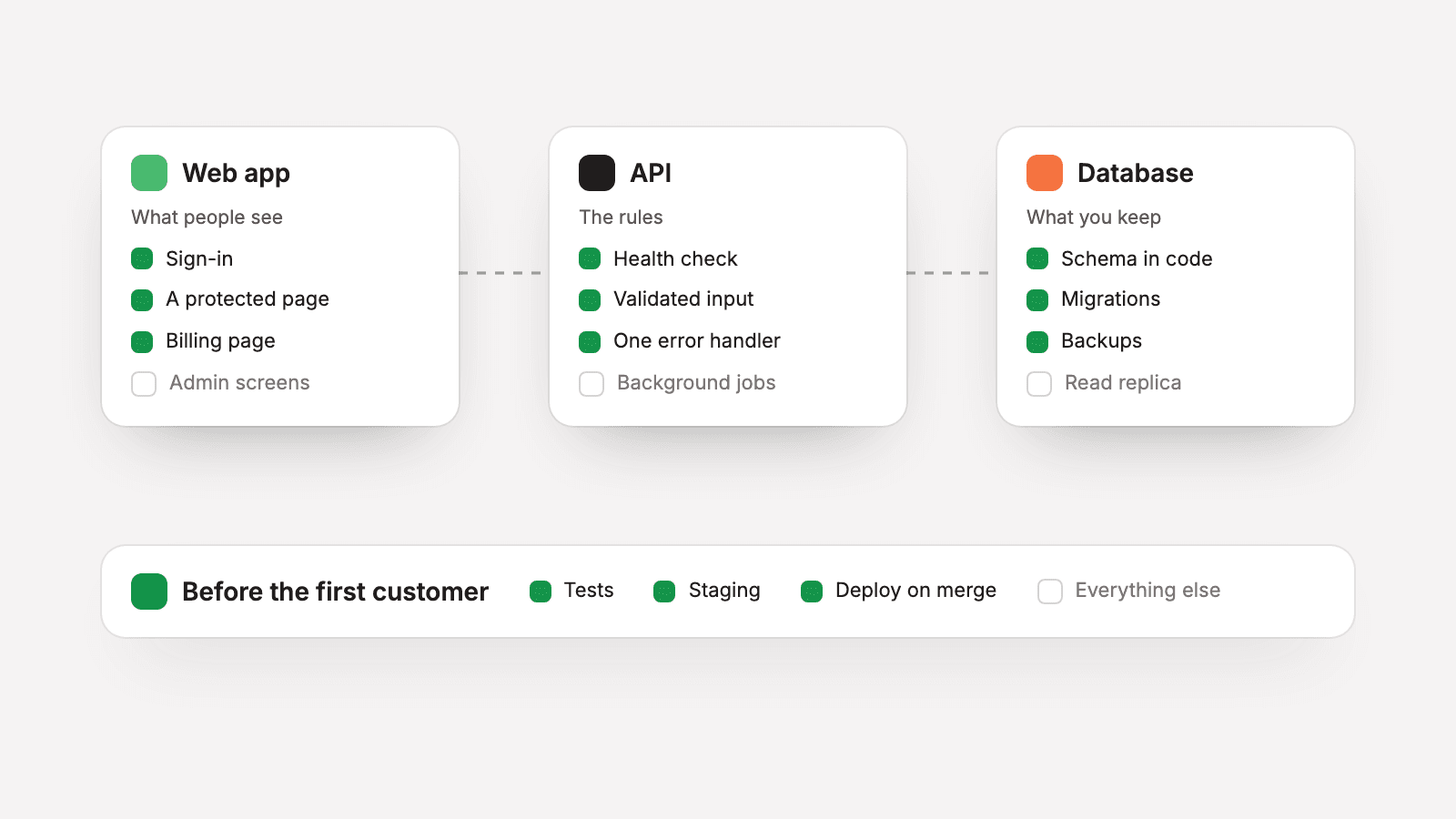
The map of a first production web app and the order to build it in: what stack to pick, the parts every app needs before its first customer, what can wait, and how to start from a template with a coding agent.
Last verified against the official Next.js, Express and Postgres documentation on October 12, 2026. Prices and free tiers change, so open the linked pages before you rely on a number.
Working with a coding agent? Get the agent file for this guide. It covers the same setup as exact steps an agent can follow.
This guide is the map of a first production web application and the order to build it in. It is for a founder building with an AI coding agent who wants to know what has to exist before the first customer signs up, what can wait, and which decisions are expensive to change later.
It is written from the repository behind this site. Next to the marketing site it holds our customer app: a Next.js client, a separate Express API and a PostgreSQL database in one pnpm workspace. That app runs on Railway in staging and in production, and sign-in works in production. Billing is not switched on there yet, and this guide makes no claim about running the app under load. It describes how the skeleton is put together and what the tools' own documentation says today.
Three parts have their own guides, and this one does not repeat their steps: sign-in with Clerk, payments with Stripe and deploying to Railway. Each is linked again at its step.
What it costs
Nothing, until you deploy. The web app, the API and the database all run on your own machine, and steps 1 to 6 can be finished there. Sign-in needs a Clerk application, and a development instance is enough.
The costs start with the hosted services. Each of the three guides above opens with what its service charged on the day we checked.
What to choose, in short
Pick tools that are widely used, well documented and familiar to your coding agent. This is our stack, with the versions our lockfile resolves today:
- Language: TypeScript 5.9 with strict mode on. Turning it on later means fixing every error it finds at once.
- Runtime: Node.js 24, in the
enginesfield and in every Docker image. The Node.js release table lists 24 as an LTS line. - Web app: Next.js 16.4 with the App Router, on React 19.3. Pages are Server Components, which React documents as stable in React 19.
- API: Express 5.3, in its own process.
- Database: PostgreSQL 16, with Prisma ORM 7.10 for the schema, the migrations and the queries.
- Validation: Zod on every request body.
- Workspace: pnpm 10.30 workspaces, with Turborepo 2.10 running the tasks.
- Tests: Vitest 5 for unit and API tests, and Playwright 1.64 for tests that drive a browser.
- Services: Clerk for sign-in and organizations, Stripe for billing, Railway for hosting.
Check the version before the first install
An agent starts from the version it remembers. Three of these tools now document a newer major version than the one we run, and the steps below are written for ours:
- Prisma. We run Prisma ORM 7.10.0, pinned exactly, because version 8 is not final. Prisma's release status page calls version 8 a release candidate whose API may still change, and says version 7 gets fixes for 18 months after version 8's final release. It also warns that
npm install prismanow installs the version 8 command-line tool, which does not readschema.prisma, and tells version 7 projects to lock the version. The Prisma links below go to the version 7 pages. - pnpm. We pin pnpm 10.30.3 in the
packageManagerfield. pnpm's installation page names version 12 as the current release line, so the pnpm links below go to the version 10 pages. - TypeScript. We are on TypeScript 5.9. The TypeScript download page gives 7.0 as the latest version, and Next.js has its own notes on using TypeScript 7, so read them before you choose.
One app or two
We run the client and the API as two services. The API holds every rule about who may see what, and a second client (a mobile app, an MCP server) can call it directly. The cost is two deployments, CORS between them, and a session token passed across on every request.
The simpler choice for a first product is one Next.js app with route handlers as the API: one deployment and one place to check a session. Split the API out when a second client needs it. What this guide says about validation, tests and health checks applies to both shapes.
What every app needs before the first customer
The same parts sit under every product. Each line says what ours does.
- Accounts and sign-in. A provider, not passwords in your own database. Ours is Clerk.
- Organizations, if you sell to companies. Members, invitations and roles, and a guarantee that one company never sees another's data (step 5).
- A database with migrations. Every schema change is a file in git, applied the same way everywhere.
- An API that validates its input. Every request body is parsed against a schema first, and every error leaves through one handler.
- Billing. A hosted checkout page, a signed webhook, and a billing portal the customer operates themselves.
- Transactional email. Clerk sends our sign-in and invitation emails. For our own messages, the marketing site's code sends through one small interface, with a Resend sender behind it and a logging stand-in when no key is set. That path is wired in code and has not sent an email in production yet.
- Analytics and error tracking. Analytics is live on our marketing site, on PostHog, with nothing stored in the visitor's browser, an allow-list of event properties, and session replay and click capture off. The customer app's error reporting and analytics are in code, off until a key is set.
- A deploy pipeline with staging. Production and staging are defined in one file, and staging has its own database and test-mode keys.
- Health checks. One route per service that depends on nothing but the process being up.
- Tests and CI. The checks run from one command, and step 7 puts them in a workflow.
Before you start
- Node.js 24, pnpm and Docker on your machine. Docker is only for the local database.
- A GitHub repository. CI and the deploy both hang off it.
- One sentence that says who the customer is: a person, or a company with several people (step 5).
- An instruction file for your coding agent, which step 1 covers.
Step 1: start from a template, and brief your agent
Do not start from an empty folder. An agent given one will invent a project structure, and you will spend the first week arguing with it. Start from something that already builds.
The smallest starting point is the framework's own. The Next.js installation page gives one command, and says its default setup enables TypeScript, Tailwind CSS, ESLint, the App Router and Turbopack, and includes an AGENTS.md file to guide coding agents:
pnpm create next-app@latest my-app --yes
cd my-app
pnpm dev
A fuller start is a template repository. GitHub's page on creating a repository from a template says the new repository has the same files and directory structure and starts with a single commit. Our customer app began as a copy too: the platform core of an earlier project of ours, with everything product-specific removed.
Then write the instruction file. Ours is a CLAUDE.md at the repository root with the layout of the workspace, the commands to run and the rules new code must keep. Anthropic's page on how Claude Code remembers a project says the file is read at the start of every session, that Claude Code can read an AGENTS.md in its place, and that you should target under 200 lines because longer files reduce how closely the instructions are followed. Ours is 353 lines, so that advice applies to us too.
Put rules in that file as you make them: where routes are mounted, how a feature folder is named, what must never be read from a request body. An agent cannot follow a rule that exists only in your head.
Step 2: set up the workspace
A single Next.js project needs no workspace. If you chose one app, read only the scripts and linting samples below.
With a client and an API, put both in one repository so a change that touches both is one pull request. Ours has apps for the things that deploy and packages for the code they share. The pnpm workspaces page says a workspace must have a pnpm-workspace.yaml file in its root. An app depends on a shared package with the version workspace:*, and the same page says pnpm then refuses to resolve to anything other than a local workspace package.
Turborepo runs the tasks in the right order. In our turbo.json the build task has "dependsOn": ["^build"], and the Turborepo documentation explains that the ^ tells it to run the task in a package's dependencies first. Our lint, type-check and test tasks depend on ^build too, because an app cannot be type-checked against a shared package that has not been built.
A handful of commands drive the whole workspace. To run a script in one workspace, pnpm's filtering page gives the --filter flag with the package name:
pnpm install                 # one lockfile for every app and package
pnpm build                   # turbo build: shared packages first, then the apps that import them
pnpm lint                    # turbo lint: the ESLint CLI, workspace by workspace
pnpm type-check              # turbo type-check: tsc --noEmit, workspace by workspace
pnpm test                    # turbo test: vitest run, unit tests only
pnpm --filter api dev        # run one workspace by its package name
Behind those commands, each app has its own scripts. Two of the web app's are specific to Next.js 16. The version 16 upgrade guide says the next lint command has been removed, that next build no longer runs linting, and that Turbopack is used by default for next dev and next build. So lint calls the ESLint CLI. And because we do not commit the type file Next.js generates, type-check runs next typegen before the compiler:
{
  "scripts": {
    "dev": "next dev -p 3200",
    "build": "next build",
    "start": "next start -p 3200",
    "lint": "eslint src",
    "type-check": "next typegen && tsc --noEmit",
    "test": "vitest run"
  }
}
The ESLint CLI needs a config file. Ours is the flat config from Next.js's ESLint page. We lint with ESLint 9, and that page says the Next.js config supports versions 9 and 10 and that some of its plugins do not list 10 in their peer dependencies yet.
// eslint.config.mjs
import { defineConfig, globalIgnores } from 'eslint/config';
import nextVitals from 'eslint-config-next/core-web-vitals';
import nextTypescript from 'eslint-config-next/typescript';

// Next.js 16 has no "next lint". The lint script runs the ESLint CLI against this file.
export default defineConfig([
  ...nextVitals,
  ...nextTypescript,
  globalIgnores(['.next/**', 'out/**', 'build/**', 'next-env.d.ts']),
]);
One warning from our own notes: a package that holds React context, such as the Clerk SDK, must resolve to a single copy across the workspace, or hooks fail with a missing provider error.
Step 3: add the database and the first migration
Run PostgreSQL locally in a container, on the same major version you will host. PostgreSQL's versioning policy says a major version is supported for five years, and lists version 16, which we run, until November 9, 2028. Our Compose file starts it with a health check, and Docker's reference for docker compose up says the --wait flag waits for services to be running or healthy.
Decide the conventions before the first table, because changing them later means a migration on every table. Ours:
- Tables and columns are snake_case in the database and camelCase in code.
- Business rows are soft-deleted with a
deleted_atcolumn, and every read filters deleted rows out. - Every table that belongs to a customer carries an
organization_id, and every query filters by it. - Ids are generated by the database, with a prefix that says what the row is.
Prisma ORM 7 splits its setup across three files.
The CLI configuration. Prisma's version 7 upgrade guide says the url and directUrl lines in the schema are deprecated in favor of prisma.config.ts, that a project which used directUrl for migrations passes that value as the url there, and that environment variables are no longer loaded by default. Ours follows all three:
// prisma.config.ts, next to the API's package.json. Only the Prisma CLI reads it.
import 'dotenv/config'; // the Prisma 7 CLI does not load .env on its own

import { defineConfig } from 'prisma/config';

export default defineConfig({
  // A folder, because the models are split across prisma/models/*.prisma.
  schema: 'prisma',
  migrations: {
    path: 'prisma/migrations',
    seed: 'tsx prisma/seed.ts',
  },
  datasource: {
    // The CLI migrates over a direct connection when one is set.
    // process.env, not Prisma's env() helper: env() throws when the variable is
    // unset, and prisma generate also runs in the image build, with no database.
    url: process.env.DIRECT_URL || process.env.DATABASE_URL || '',
  },
});
The schema line names a folder because we keep one file per model. Prisma's page on schema location says a multi-file schema must have its directory named explicitly, and that the migrations directory must sit at the same level as schema.prisma.
The schema. The generators page says the prisma-client generator outputs plain TypeScript and requires an output path. We do not commit that folder. The generator and datasource blocks from our schema, and one model, trimmed:
// prisma/schema.prisma (Prisma ORM 7)
// The client is generated as TypeScript into src/ and compiled with the API.
// Our API builds to CommonJS, hence moduleFormat.
generator client {
  provider     = "prisma-client"
  output       = "../src/generated/prisma"
  moduleFormat = "cjs"
}

// No url here: Prisma 7 reads it from prisma.config.ts.
datasource db {
  provider = "postgresql"
  schemas  = ["app"]
}

// prisma/models/organization.prisma
model Organization {
  // app.nanoid() is a SQL function our first migration creates. Use the id
  // default Prisma documents if you do not want to write one.
  id        String    @id @default(dbgenerated("app.nanoid('co_'::text)"))
  clerkId   String    @unique @map("clerk_id")
  name      String    @map("name")
  createdAt DateTime  @default(now()) @map("created_at")
  updatedAt DateTime  @updatedAt @map("updated_at")
  // Soft delete. Every read filters on deletedAt: null.
  deletedAt DateTime? @map("deleted_at")

  // Written only by the Stripe webhook.
  stripeCustomerId   String? @unique @map("stripe_customer_id")
  planSlug           String  @default("free") @map("plan_slug")
  subscriptionStatus String? @map("subscription_status")

  @@index([deletedAt])
  @@map("organizations")
  @@schema("app")
}
The client. The upgrade guide says creating a client now requires a driver adapter for every database, and its PostgreSQL example uses @prisma/adapter-pg. It also warns that the pg driver has no connection timeout by default, where Prisma ORM 6 gave up after five seconds. Our adapter sets the timeout back, so a startup check can fail and be retried:
// database/adapter.ts
import { PrismaPg } from '@prisma/adapter-pg';

// The pg driver waits forever for a connection unless it is told otherwise.
const CONNECTION_TIMEOUT_MS = 5_000;

export function createPostgresAdapter(
  connectionString: string | undefined = process.env.DATABASE_URL,
): PrismaPg {
  // Fail at boot, so a missing variable never falls back to the driver's localhost defaults.
  if (!connectionString) {
    throw new Error('DATABASE_URL is not set. The Prisma client needs a Postgres connection string.');
  }
  return new PrismaPg({ connectionString, connectionTimeoutMillis: CONNECTION_TIMEOUT_MS });
}

// Anywhere a client is made. The generated client is imported by its path.
import { PrismaClient } from './generated/prisma/client';

const prisma = new PrismaClient({ adapter: createPostgresAdapter() });
Two commands apply migrations. Prisma's page on development and production says migrate dev generates a migration from your schema change and applies it, and should never be used in production. migrate deploy applies pending migrations, does not reset the database, and should generally run in an automated pipeline.
# Postgres 16 in a container. --wait returns once its health check passes.
docker compose up -d --wait

# Development only: prisma migrate dev, then prisma generate.
# It writes a migration from the schema change and applies it.
pnpm --filter api db:migrate

# Everywhere else (CI, staging, production): prisma migrate deploy.
# It applies the migrations already in git and nothing more.
pnpm --filter api db:migrate:deploy
Put those commands behind package scripts so nobody types the wrong one. The upgrade guide says migrate dev no longer runs prisma generate and no longer seeds, so our scripts do both explicitly:
{
  "scripts": {
    "build": "prisma generate && tsc && tsc-alias",
    "lint": "eslint src",
    "type-check": "tsc --noEmit",
    "test": "vitest run",
    "test:int": "vitest run --config vitest.int.config.ts",
    "db:generate": "prisma generate",
    "db:migrate": "prisma migrate dev && prisma generate",
    "db:migrate:deploy": "prisma migrate deploy",
    "db:seed": "prisma db seed"
  }
}
Commit the migration folder. Our migrations run on staging and production as a step before each deploy, which the Railway guide shows, so the migration that worked locally is the one that ships. We keep a second local database that the tests may empty.
Step 4: build the API with a health check and one validated route
Start with the route that proves the process is up. It must not touch the database or the sign-in provider: its job is to tell a deploy whether the app started. Ours answers on every path the auth middleware skips:
// health.routes.ts
import { Router } from 'express';

/** Paths the auth middleware skips. Each needs a route, or it falls through to the auth guard. */
export const HEALTH_PATHS: readonly string[] = ['/api/v1/health', '/health'];

// No database, no auth, no upstream calls. It answers only "is the process up?".
export function createHealthRouter(): Router {
  const router = Router();
  router.get([...HEALTH_PATHS], (_req, res) => {
    res.json({ status: 'ok', timestamp: new Date().toISOString(), service: 'api' });
  });
  return router;
}
Then the mount order. It matters more than any single route, because in Express a route is public or protected purely by where it sits. Ours is spread across an entry file, a router and a shared package. This is the same sequence in one place:
// src/index.ts, trimmed. Express 5.
import express from 'express';
import helmet from 'helmet';
import cors from 'cors';

const app = express();

async function start(): Promise<void> {
  // Raw-body parsers for webhook paths are mounted here, before express.json().

  // A waking database refuses connections for a few seconds. Retry, then give up.
  await waitForDatabase(
    async () => {
      await prisma.$queryRaw`SELECT 1`;
    },
    { attempts: 10, delayMs: 3000, log: console.warn },
  );

  app.use(express.json());
  app.use(helmet());
  app.use(cors({ origin: corsOrigins, credentials: true }));
  app.use('/api', rateLimiter);

  // 1. Public: the health check and signed webhooks. Nothing here needs a session.
  app.use(createHealthRouter());
  // 2. The auth guard. Ours answers 401. Everything mounted below it needs a verified session.
  app.use(requireAuth());
  // 3. Feature routers. Organization-scoped ones sit behind a membership check (step 5).
  app.use('/api/v1/users', createMeRouter(prisma));
  app.use('/api/v1/:clerkOrgId', orgRouter);
  // 4. The error handler, last.
  app.use(errorHandler);

  const port = parseInt(process.env.PORT ?? '3201');
  app.listen(port, (error?: Error) => {
    // Express 5 passes a failed listen (a port in use, for example) to this
    // callback instead of throwing. Exit so the host restarts the process.
    if (error) {
      console.error(`[api] could not listen on port ${port}:`, error);
      process.exit(1);
    }
    console.log(`[api] listening on port ${port}`);
  });
}

// No database after the retries: exit non-zero and let the host restart the process.
start().catch((error) => {
  console.error('Unhandled error during startup:', error);
  process.exit(1);
});
Three details in that file are easy to skip. The security headers come from Helmet, which the Express security best practices page recommends. The server retries the database a bounded number of times, then exits, so the host restarts it instead of serving errors. And the listen callback checks for an error: the Express version 5 migration guide says a failed listen is now passed to that callback, where Express 4 threw it.
Now one real route from our API, built the way every later one will be: the body is parsed against a Zod schema before anything reads it. Zod's basics page says .parse returns a typed deep clone of valid input and throws a ZodError otherwise, and that z.infer extracts the static type from the schema:
// organizations.schemas.ts
import { z } from 'zod';

// Only the fields a caller may change. Ids, slugs and counts are not accepted.
export const updateOrganizationSchema = z.object({
  name: z.string().min(1).max(200).optional(),
  imageUrl: z.string().url().optional().nullable(),
  primaryColor: z.string().max(20).optional().nullable(),
});

// The type comes from the schema, so the two cannot drift apart.
export type UpdateOrganization = z.infer<typeof updateOrganizationSchema>;

// organizations.controller.ts
async updateCurrent(req: Request, res: Response): Promise<void> {
  // The organization comes from the verified session, never from the URL or the body.
  const { organizationId } = getAuthContext(req);

  // Throws a ZodError on bad input. Express 5 hands it to the error handler, which answers 400.
  const data = updateOrganizationSchema.parse(req.body);

  const org = await this.model.updateForOrg(organizationId, data);
  if (!org) {
    sendError(res, 404, 'Organization not found');
    return;
  }

  sendData(res, formatOrgResponse(org));
}
The handler is an async function with no try and catch. The Express error handling guide says a handler that returns a promise calls next(value) automatically when it rejects or throws, so the validation error reaches the error handler with no extra package. The same guide says an error handler is defined last and is recognized by its four arguments. Ours turns a validation error into a 400 and anything unexpected into a 500 that tells the client nothing:
// utils/zod-error.ts
/** The part of a Zod validation error the handler reports. */
interface ZodErrorLike {
  readonly name: 'ZodError';
  readonly issues: readonly unknown[];
}

// Matches a ZodError from any installed copy of zod: every major names it and carries issues.
function isZodError(err: unknown): err is ZodErrorLike {
  return err instanceof Error && err.name === 'ZodError' && Array.isArray((err as { issues?: unknown }).issues);
}

// Tell the caller which field failed and why, and nothing else. A Zod issue can
// carry the value that was submitted, so issues are never sent or logged whole.
function validationDetails(issues: readonly unknown[]) {
  return issues.map((issue) => ({
    path: pathOf(issue),
    code: stringField(issue, 'code') ?? 'unknown',
    message: stringField(issue, 'message') ?? 'Invalid value',
  }));
}

// backend.ts. Mounted last, after every router. Four arguments make it an error handler.
app.use((err: Error, req: Request, res: Response, _next: NextFunction) => {
  if (isZodError(err)) {
    // The log gets the field and the kind of problem. Never the request body.
    apiLogger.warn('Validation error', { errors: validationLogEntries(err.issues), path: req.path, method: req.method });
    return res.status(400).json({
      success: false,
      code: 'VALIDATION_ERROR',
      message: 'Validation failed',
      details: validationDetails(err.issues),
    });
  }

  if (err.name === 'AuthenticationError') {
    return res.status(401).json({ success: false, code: 'UNAUTHORIZED', message: 'Authentication required' });
  }

  // Log the real error on the server. Tell the client nothing about it.
  logger.error('Unhandled route error', { error: err.message, stack: err.stack, method: req.method, path: req.path });
  res.status(500).json({ success: false, code: 'INTERNAL_SERVER_ERROR', message: 'Internal server error' });
});
The handler matches a Zod error by name and shape because our workspace holds two major versions of Zod: the API validates with Zod 3 and the shared package that owns this handler uses Zod 4. On one version, instanceof is enough.
Because that check goes by shape, the handler never passes a Zod error's issues along whole. An issue can carry the value that was submitted, so the caller gets the field, a code and a message for each one, and the log gets the field and the code. The request body is never logged.
Two more habits that are cheap now and expensive later. Every response uses one envelope, { success: true, data } or { success: false, code, message }, sent through two helpers so no route can drift from it. And each feature is one folder with the same four files (routes, controller, model, schemas) and its tests beside them, so an agent adding a feature copies the folder next to it.
Step 5: add sign-in, protect a page, and decide about organizations
Follow adding sign-in with Clerk for the setup: the proxy file, the sign-in screens, the checks on pages and the API, and the webhook that syncs your user table. Come back when a signed-in user can load a page.
Expect one naming change on the way. The Next.js proxy page says the middleware file convention is deprecated and renamed to proxy, and the upgrade guide adds that a proxy runs on the Node.js runtime. Ours is src/proxy.ts. It makes the session readable and protects nothing, and its matcher skips the health check.
Every protected page of ours is a thin server component that checks the session, then renders a client component:
// app/(admin)/billing/page.tsx
// Rendered on each request, which also lets the app build with no auth keys present.
export const dynamic = 'force-dynamic';

import { auth } from '@clerk/nextjs/server';

import { BillingView } from '@/components/pages/BillingView';

export default async function BillingPage() {
  // Signed out: redirects to the sign-in screen.
  await auth.protect();

  return <BillingView />;
}
The check is in the page, not in a layout or in the proxy, and a test keeps it that way. It lists every page and route handler and fails when a new one is not marked public or protected.
Organizations
If each customer is one person, skip this. If a customer is a company, decide now: adding a tenant to every table and query later is the most expensive change in this guide. Clerk's Organizations overview describes the feature as a way to build multi-tenant B2B apps, with users grouped under roles and permissions. At the time of writing the same page says free plans include up to 50 monthly retained organizations in development and 100 in production.
Clerk tells you which organization a user is acting in. Keeping one organization's data from another is your code's job. In our API every organization-scoped route sits under a URL segment that names the organization, and one middleware checks membership before any handler runs:
// Mounted on /api/v1/:clerkOrgId, after the auth guard. The URL selects the
// organization. It never grants access to it.
export function createOrgUrlScope(prisma: PrismaClient) {
  return async (req: Request, res: Response, next: NextFunction): Promise<void> => {
    const clerkOrgId = req.params['clerkOrgId'];
    // req.provisioned is set by the auth middleware from the verified session.
    const userId = req.provisioned?.user?.id as string | undefined;

    // Express 5 types a param as string | string[] (wildcards are arrays).
    // A named segment is a string, so anything else is no organization.
    if (typeof clerkOrgId !== 'string' || !clerkOrgId || !userId) {
      sendError(res, 404, 'Organization not found');
      return;
    }

    const membership = await prisma.userOrganization.findFirst({
      where: { userId, deletedAt: null, organization: { clerkId: clerkOrgId, deletedAt: null } },
      select: { organization: { select: { id: true, clerkId: true } } },
    });

    // 404, not 403: a non-member must not learn that the organization exists.
    if (!membership) {
      sendError(res, 404, 'Organization not found');
      return;
    }

    req.provisioned = { ...req.provisioned, organization: membership.organization };
    next();
  };
}
Behind it, every database query takes the organization id from the verified session and filters by it. A test calls every scoped route as a member of another organization and expects a 404, or a list with none of the other organization's rows. Write it with the first scoped route and add a case with each one after.
Step 6: write the tests that protect the skeleton
A first app needs a few tests on the things that would hurt most if they broke unnoticed. Ours:
- The health check answers with no credentials.
- Every page and route is listed as public or protected, and the protected ones refuse a signed-out request.
- No organization can read another's rows.
- A bad request body gets a 400 and never reaches the database.
- The billing webhook sets the plan from what the event says, downgrades on cancellation and rejects a bad signature.
The first one, from our API. The Vitest guide says test files are found by .test. or .spec. in their name, that vitest run runs them once without watching, and that Vitest requires Node 22.12 or later:
// health.routes.test.ts
import { describe, it, expect } from 'vitest';
import express from 'express';
import supertest from 'supertest';
import { createHealthRouter, HEALTH_PATHS } from './health.routes';

describe('createHealthRouter', () => {
  it.each(HEALTH_PATHS)('answers ok on %s without auth', async (path) => {
    const app = express();
    app.use(createHealthRouter());

    const res = await supertest(app).get(path);

    expect(res.status).toBe(200);
    expect(res.body).toMatchObject({ status: 'ok', service: 'api' });
  });
});
We split the API's tests in two. Unit tests need no keys and no database and run with pnpm test. Integration tests run the real routes against a real Postgres and are skipped unless a test database URL is set. We do not mock the database there: a fake agrees with whatever the code assumes, which an isolation test must not do.
Browser tests come last. Playwright's web server option starts your dev servers before the tests and can launch several at once, which suits a client and an API. Ours are written and type-check, and we have not run them in this repository yet. Do not wait for them before you ship the skeleton.
Step 7: run the checks on every pull request
No workflow in our repository runs the tests on pull requests. Its two workflows apply our hosting configuration and put a branch on staging by hand. The four checks (build, lint, type-check, test) are one line in our docs, run from a terminal. That works for one person until the day they forget, so do not copy that part.
The workflow below is the one to add. We have not run it in this repository. It is built from what we do run: the setup steps of our hosting workflow, with a full install, and the four commands from step 2, which need no keys and no database:
# .github/workflows/ci.yml
name: CI

on:
  push:
    branches: [main]
  pull_request:

jobs:
  check:
    runs-on: ubuntu-latest
    steps:
      - uses: actions/checkout@v4
      # No pnpm version here: package.json pins it in the packageManager field.
      - uses: pnpm/action-setup@v4
      - uses: actions/setup-node@v4
        with:
          node-version: 24
          cache: pnpm
      - run: pnpm install --frozen-lockfile
      # Build first: it writes the generated Prisma client that type-check needs.
      - run: pnpm build
      - run: pnpm lint
      - run: pnpm type-check
      - run: pnpm test
pnpm's continuous integration page for version 10 shows the same two setup actions. When you add integration tests, GitHub's guide to PostgreSQL service containers shows how to start a Postgres beside the job, with a health check so the tests wait for it.
Keep the push trigger. Railway's page on GitHub autodeploys says that with Wait for CI enabled a deployment waits for the GitHub Actions check suites on the commit, that a failing workflow skips it, and that the workflow must run on push. Our hosting configuration has that setting off, to turn on with the workflow.
Step 8: deploy it, with staging, before you build features
Deploy the skeleton now, while it is a health check, one route and a sign-in page. A deploy that fails with ten lines of your code behind it is a short problem. Three months in, it is a long one.
Deploying to Railway with a custom domain has the steps. Four things from our setup are specific to an app with an API:
- Two environments from the first day. Railway's environments page says every project is created with a production environment, and that a new environment can be empty or a duplicate of an existing one. Ours are production and staging, described by one file, and a merge to the main branch deploys both. Staging has its own Postgres, Clerk's development instance and Stripe test-mode keys, so nothing done there reaches a real customer or card.
- A health check on each service. Neither passes through the sign-in code.
- Migrations before the new version goes live. The API's image carries the schema, the migrations and
prisma.config.ts, and its pre-deploy step runsmigrate deploy. A broken migration fails the deploy and the previous version keeps serving. - Secrets by name only. Our hosting file lists every variable each service reads and holds no secret value.
Our customer app is set up this way: both environments run it, production uses Clerk's production instance, and production billing waits for its live keys.
Step 9: add billing when there is something to sell
Billing comes after sign-in and the deploy: a payment has to attach to an account, and the webhook needs a public address. Taking payments with Stripe covers checkout, the webhook and the billing portal.
What to prepare in the skeleton is small. Our organization table has three columns for it: the Stripe customer id, the plan and the subscription status, with the plan defaulting to free. Only the Stripe webhook writes the last two. Without Stripe keys our API still boots, billing is switched off and every organization stays on the free plan, so the rest of the app can ship before a price exists.
Step 10: email, analytics and error tracking
These are the easiest to postpone and the most painful to be missing when something goes wrong. Each service's setup is outside this guide. The skeleton needs only the seam:
- Email. Send through one small interface, with a real sender and a stand-in that only logs. The app then runs with no email account, and tests never send mail. Choose a provider with an HTTPS API: Railway's page on outbound networking says SMTP is only available on its Pro plan and above, and that the other plans must use transactional email services with HTTPS APIs.
- Error tracking. Report from the one error handler in step 4, so every unexpected error is captured in one place with the signed-in user attached. Ours does nothing when no key is set.
- Analytics. Decide the handful of events that show the product is used (signed up, created the first thing, invited someone, paid) and send those. Start with the privacy settings closed, as our marketing site does.
What production ready means on day one
For a first customer it is a short list, all of it in the steps above:
- Nobody can read data that is not theirs, and a test proves it.
- Bad input is rejected at the door with a 400.
- Schema changes are migrations in git, applied by the deploy and not by hand.
- A broken build cannot go live: the checks run first, and the health check has to pass.
- There is a staging copy to try a change on.
- No secret is in the repository.
- When something fails, you find out from a report and not from a customer.
- Payment state is written by the payment provider's webhook and by nothing else.
And these can wait until the product needs them:
- Caches, queues and background workers.
- More than one instance of each service, and more than one region. Ours runs one of each in one region.
- An admin back office and an audit log.
- A browser test for every screen.
- Your own screens for anything a provider already hosts, such as the billing portal.
One thing does not belong on the second list, however early you are: backups of the production database. Check what your host provides, and restore one before you have data you cannot lose.
Where first apps go wrong
- Building features for a month before the first deploy.
- Adding organizations after the tables exist.
- Checking the session in a layout or in the proxy and nowhere else.
- Reading a user id, an organization id or a price from the request body.
- Running
migrate devagainst a database that holds real data. - Installing a tool without a version and getting a major release the rest of the project was not written for.
Hand this to your agent
This guide is also written out for a coding agent, as one Markdown file. It has the checks to run in your repository first, each step with its commands and code, the environment variables by name, a check after every step, and the points where the agent has to stop and ask you. Get the agent file and give your agent the file or its address.
The file has the agent scaffold the skeleton on your machine only. It sends the agent to the Clerk, Stripe and Railway agent files for those parts, and it leaves accounts, secret values, the choice between one app and two, and every deploy to you.
Next
The setup guides pick up where this one stops: sign-in with Clerk, deploying to Railway, then payments with Stripe.
Our kits page lists two starting points on this stack. The Application kit is for products used by teams: a Next.js 16 web app and an Express 5 API on Postgres in one pnpm workspace, with Clerk organizations, Stripe billing for each organization, production and staging on Railway, tests and a CI workflow. The Solo starter app is free and open source, for products with one user per account: Clerk sign-in, one Stripe plan with its billing portal and a deploy to Railway, on the same package versions as the kit.
Sources
- Installation, Next.js Docs
- How to upgrade to version 16, Next.js Docs
- proxy.js file convention, Next.js Docs
- ESLint configuration, Next.js Docs
- TypeScript configuration, Next.js Docs
- Server Components, React
- TSConfig reference: strict, TypeScript
- Download TypeScript, TypeScript
- Node.js releases, Node.js
- Installing, Express
- Migrating to Express 5, Express
- Error handling, Express
- Production best practices: security, Express
- Versioning policy, PostgreSQL
- Release status, Prisma Docs
- Upgrade to Prisma ORM 7, Prisma Docs
- Schema location (Prisma ORM 7), Prisma Docs
- Generators (Prisma ORM 7), Prisma Docs
- Development and production (Prisma ORM 7), Prisma Docs
- Basic usage, Zod
- Installation, pnpm
- Workspace (pnpm 10), pnpm
- Filtering (pnpm 10), pnpm
- Continuous integration (pnpm 10), pnpm
- Configuring tasks, Turborepo
- Getting started, Vitest
- Web server, Playwright
- docker compose up, Docker Docs
- Creating a repository from a template, GitHub Docs
- Creating PostgreSQL service containers, GitHub Docs
- How Claude remembers your project, Claude Code Docs
- Organizations overview, Clerk Docs
- Environments, Railway Docs
- GitHub autodeploys, Railway Docs
- Outbound networking, Railway Docs
Want this already wired together?
This stack is packaged as production kits you can buy and build on. If you would rather have us build it with you, book a call.